
Product Description
This is a physical USIM product for data use available in Russia.
You can use 3G / 4G LTE data services through the MTS or T2 Mobile supported network.
Even after using all the ultra-fast data provided every day, the Internet does not completely go down. Unlimited use at a low speed of 384kbpsI can do it.
The usage period is Russia: Calculated in 24-hour blocks starting from the moment of activation on a supported local networkIt is calculated, and the daily data is automatically reset every 24 hours.
🌐 Supported countries
🇷🇺 Russia
Russia
📦 Product information
✔ Physical USIM
✔ Data only
✔ Daily data provided
✔ Low speed unlimited after daily data exhaustion
🚀 QoS low speed
384kbps
📅 Product Validity Period
180 days
📌 The ultra-fast data capacity provided per day is applied based on the product option purchased.
📌 If you use all the data provided for a day The speed is limited to 384kbps, but you can continue to use the data.
📌 You can use daily high-speed data again from the time of data reset in the next 24 hours.
📡 Communication information
🏢 Supported carriers
MTS
T2 Mobile
📶 Network
3G / 4G LTE
🌐 Network type
Roaming network
📞 Voice call
Not supported
💬 SMS text messages
Not supported
📱 Product form
Physical USIM for data only
📌 Connection may be established via MTS or T2 Mobile networks depending on the region and local network conditions.
📌 The mobile phone may display the name of MTS, T2, or a partner roaming carrier.
📌 The actual connection carrier may not be selected by the user at will.
📌 Actual connection speed and quality may vary depending on the region, mobile phone model, supported frequency, terrain, and local network conditions.
♾️ How do I use unlimited every day?
This product provides a fixed high-speed data for one day.
If you use all the data provided for a day, the Internet will not be blocked. Continue to use at a 384kbps QoS speedI can do it.
Using ultra-high-speed data
✔ a map·Navigation
✔ Kakao Talk
✔ LINE
✔ Telegram
✔ SNS
✔ Web surfing
✔ Travel reservation app
384kbps after the daily data is exhausted.
✔ Messenger text message
✔ Simple webpage
✔ Check the map location
✔ Text-centered service
📌 At 384kbps, high-quality videos, large downloads, and websites with many images may be slow to use.
⏰ Activation policy
✔ 1 day = based on 24 hoursIt is calculated as.
✔ After inserting the physical SIM card into your mobile phone Russia Usage begins the moment the device first connects to and activates on the local supported network.
✔ Based on the first activation date 1 day is deducted every 24 hours.
✔ Every 24 hours Daily data will be automatically reset.
illustration
If it was connected to the first supporting communication network and activated at 3 p.m. locally in Russia,
The first 24 hours is until 3 p.m. the next day.
New daily data will be applied at 3 p.m. the next day, and the second usage date will begin.
📌 Russia is not a product that resets at local midnight.
✈️ Can I plug in a physical SIM card in advance in Korea?
This product is The plan begins the moment the SIM card connects to a supported local network in Russia and activates.It’s okay.
Therefore, even if you insert the physical SIM card while in South Korea, the usage period generally does not start unless it connects to a supported local network in Russia.
To avoid unnecessary configuration errors or the loss of your physical SIM card, We recommend swapping the SIM card just before arriving in Russia or after you have arrived.Do.
📱 Available models
✔ Smartphone with Country Lock disabled
✔ Recommended smartphones released after 2015
✔ Smartphone that supports overseas 3G / 4G LTE communication networks
📌 Whether it can actually be used depends on the supported frequency of the terminal, the SIM specification, and whether the carrier is locked.
❌ Unavailable or not recommended models
Smartphones released in 2014 or earlier.
Samsung
A3
J1
J2
J3
LG
Part of the X series
V10
the others
Luna Phone
Pantek
Some Sony models
Some BlackBerry models
📌 Even with the same model name, the support frequency may vary depending on the country of release and the Cebu model number.
📌 Please check the exact terminal model before purchasing.
📍 Key Travel Areas
📍 Moscow (Moscow)
📍 Saint Petersburg (Saint Petersburg)
📍 Vladivostok (Vladivostok)
📍 Khabarovsk (Khabarovsk)
📍 Irkutsk (Irkutsk)
📍 Lake Baikal (Lake Baikal)
📍 Kazan (Kazan)
📍 Sochi (Sochi)
📍 Yekaterinburg (Yekaterinburg)
📍 Novosibirsk (Novosibirsk)
✈️ I recommend this kind of trip.
✔ Russia Free travel
✔ Business trips to Moscow
✔ Saint Petersburg Travel
✔ Vladivostok Travel
✔ Irkutsk·Lake Baikal Travel
✔ Russia Long-term stay
✔ Business Trips and Work Visits
✔ Travel in the Siberia Region
✔ Customers who need an internet connection even after running out of data for a day
⚠️ Russia regional communication guidelines
In major cities covered by Moscow, Saint Petersburg, and Vladivostok, service is available within the network range of MTS or T2 Mobile.
However, Russia is a very large country in the world, so it is a long-distance railway between Siberia, mountainous, rural, and urban long-distance railways outside the city.·In road sections, the communication network may be weak or disconnected.
When visiting Lake Baikal and the outskirts of Siberia, offline maps and accommodation·It is recommended to save traffic information in advance.
📌 During long-distance train travel, data connections may be interrupted for extended periods in areas without cell tower coverage.
📌 Signals may weaken inside subways, tunnels, and buildings.
📌 Near national borders, networks from neighboring countries may be detected.
⚠️ Internet Service Information
In Russia, depending on local policies or the operating policies of each Internet service provider, some overseas websites·App.·Access to SNS may be restricted or the service status may change.
This product is A USIM providing mobile data connectivityAnd a specific website·App.·This product does not guarantee access to SNS.
📌 If specific services are essential for your trip, please check their availability in Russia before departure.
💸 Exchange and refund policy
✔ The delivery product is Cancellation is possible before shipment.
✔ When refunding the sent physical SIM card Shipping fee charged
✔ Refund request is Possible within 7 days from the date of purchase.
✔ Products with expired validity period cannot be refunded.
✔ Delivery delays by the courier company are not eligible for our compensation.
📌 Once the plan is activated by connecting to a supported local network in Russia, the product is considered “used,” which may restrict refund eligibility.
📌 physical SIM card damage·Exchange if it cannot be used due to loss or customer negligence.·Refunds may be limited.
❓ FAQ
Which carrier can be used in Russia?
Use an MTS or T2 Mobile supported network.
The connecting carrier may vary depending on the region and local communication environment.
Can I use 4G LTE?
Yes.
Product specifications are 3G / 4G LTEWe support.
The actual connection method may vary depending on the region and local network conditions.
What does unlimited every day mean?
Even after using all the ultra-fast data provided for a day, the Internet is not blocked. A way to continue using at a low speed of 384kbps.It is.
Will the Internet be disconnected if I use all the data for a day?
No.
The speed is limited to 384kbps, but the data connection continues.
How much is the low-speed unlimited speed?
384kbpsIt is.
Is the daily limit based on local midnight in Russia?
No.
This product is Based on 24 hoursIt is.
From the time of initial activation, 24 hours will be counted as one usage day.
When will the data be reset?
The data allowance resets automatically every 24 hours based on the time of initial activation in Russia.
When does the plan start?
After inserting the physical SIM card It begins the moment the Russia connects to and activates on the local supported network.
Will the plan start if I insert a physical SIM card in advance in Korea?
The service generally does not start unless connected to a supported local network in Russia.
However, we recommend swapping the SIM just before your trip or after arriving at your Russia destination.
How long is the product valid?
180 daysIt is.
The product must be activated and used within the validity period.
Available for use in Moscow Is it available?
It can be used within the range of the communication network supported by MTS or T2 Mobile.
You may connect via 3G or 4G LTE in major city centers.
Can I use it on Vladivostok too?
It can be used within the range of the local support communication network.
Connection quality may vary depending on the region and indoor environments.
Can I use it on Lake Baikal too?
Connections are available in major cities (such as Irkutsk) and some tourist areas, but signals may be weak or unavailable in the outskirts of Lake Baikal and the Siberia region.
We recommend downloading offline maps in advance.
Can I use the phone and text message?
No.
This product is a data-only USIM and does not support general voice calls and SMS texts.
Availability of data-based messaging apps and internet services depends on local service policies and network conditions.
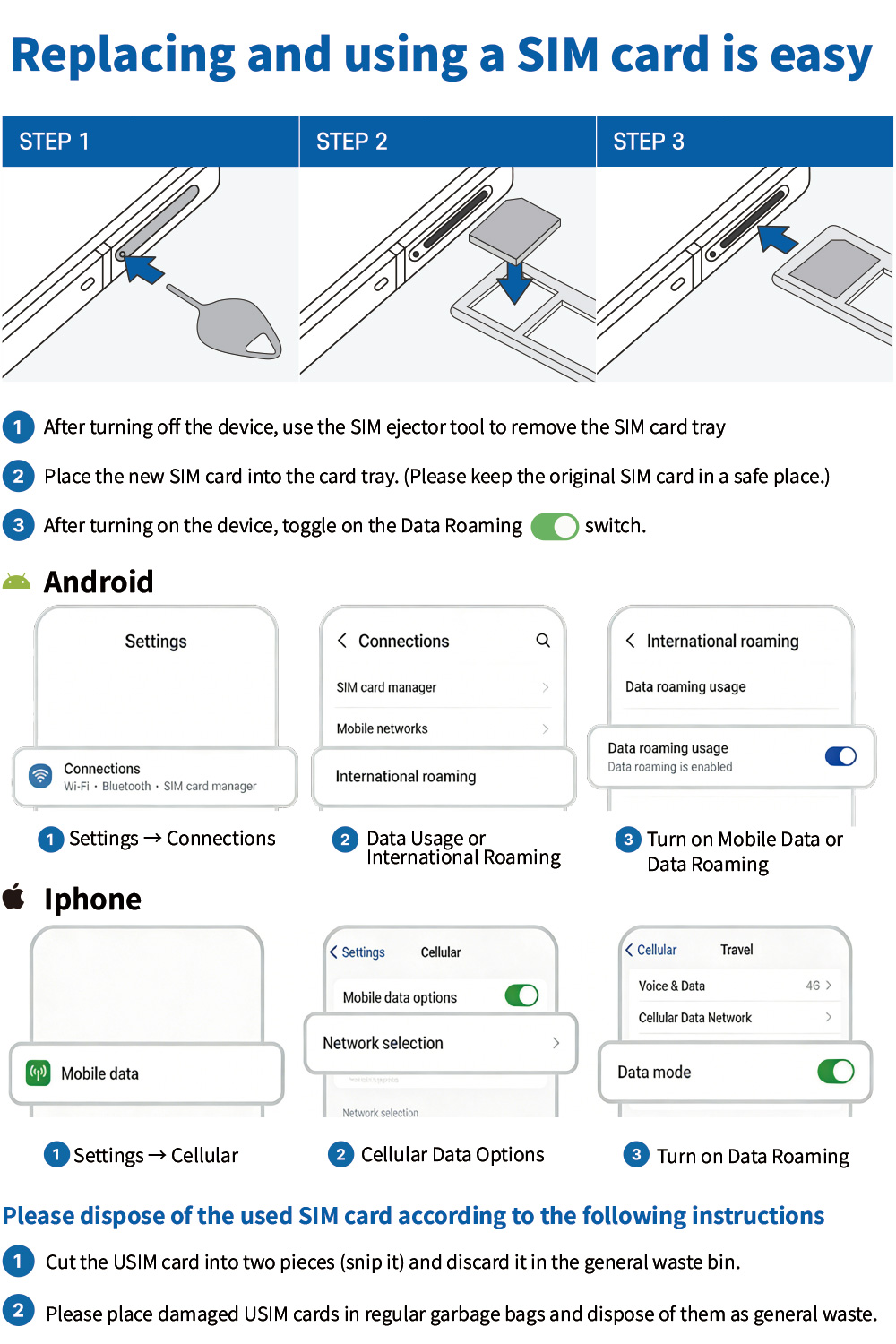
⚙️ Setup Instructions (Required)
1️⃣ Recommended installation before departure
Please install the eSIM before departure.
2️⃣ Basic settings after arrival in the local area
Arrival at the local area → After completing the activation of your mobile phone, proceed with the following settings.
✔ iPhone
establishment → cellular → Basic voice line → Change to eSIM
✔ Android
establishment → coupling → SIM manager → Main SIM card
Messages → Select eSIM1
3️⃣ Manual network selection
Please change the network manually.
✔ iPhone
establishment → cellular → eSIM → Network selection
Auto-off → MTS Select
✔ Android
establishment → Connect (or roam with T) → Overseas roaming (or roaming detailed settings)
Roaming mobile carrier → Automatic selection OFF → Select MTS
Russia roaming setup — iPhone (MTS)
- Set Cellular Data to the travel eSIM just before departure or after arrival. Turn Allow Cellular Data Switching off. The line may be named Secondary, Personal or another name.
- Use the travel line for default voice calls while completing SMS verification. You may return to your main line afterwards.
- Turn Data Roaming off for your home SIM.
- For the travel eSIM, turn Data Roaming on, select 4G or LTE, turn automatic network selection off and choose MTS.
- Open the link in the received SMS, complete the puzzle verification and restart your phone.
Russia roaming setup — Android (MTS)
- In SIM manager, keep your home SIM on only if you need calls or texts on your Korean number. Carrier roaming call charges may apply. Turn it off if not needed.
- Select eSIM1 for mobile data. Turn automatic data switching off.
- Select the appropriate SIM for calls and messages. Using your Korean number may incur carrier charges; receiving texts is free according to the source instructions.
- In Settings → Connections (or T roaming) → Overseas roaming → Roaming network, turn automatic selection off and select MTS.
- Open the link in the received SMS, complete the puzzle verification and restart your phone.
- Finally, turn Data Roaming on for the travel eSIM.
4️⃣ Puzzle authentication progress
Accessing the link of the received SMS message → Puzzle authentication progress

5️⃣ Restart your mobile phone
Please be sure to reboot the device after completing the settings.
🔁 Exchange and refund policy
-
Cancellation possible before shipment
-
Shipping fee charged for refunds after shipment
-
Refund request: Within 7 days of purchase
-
Refunds are not available for expired products.
-
No compensation for courier delivery delays
