
Product Description
📦 Product information
Uninterrupted data even in Russia 🇷🇺
You can continue to use it with QoS even after using the data provided every day. 😎
🚀 QoS (low speed): 384kbps
📅 Product validity period: 180 days
━━━━━━━━━━━━━━━━━━━━
📡 Communication information
🏢 Carrier: MTS / T2 Mobile
📶 Network: 3G / 4G / LTE
🌐 Network type: Roaming network
📞 Voice call: Not supported
💬 SMS (text message): Not supported
━━━━━━━━━━━━━━━━━━━━
⏰ Activation policy
✔ 1 day = Calculated based on 24 hours.
✔ The use begins from the moment it is activated locally after installing the eSIM.
✔ The data is reset every 24 hours based on the activation point.
✔ You can use QoS even after the daily data is exhausted.
━━━━━━━━━━━━━━━━━━━━
🚨 Please check before using Russia.
Russia Locally, manual network selection and puzzle authentication may be required.
📱 How to set up iPhone
establishment → cellular → SIM selection → Network selection → Auto-off → Select MTS
📱 How to set up Android
establishment → Connection (or Troaming) → Overseas → Roaming mobile carrier → Automatic selection OFF → Select MTS
✔ Link access received by SMS
✔ Puzzle authentication progress
✔ Use after rebooting the phone
👉 You can use the data immediately after the setting is completed. 😎

Russia roaming setup — iPhone (Beeline)
- Set Cellular Data to the travel eSIM just before departure or after arrival. Turn Allow Cellular Data Switching off. The line may be named Secondary, Personal or another name.
- Use the travel line for default voice calls while completing SMS verification. You may return to your main line afterwards.
- Turn Data Roaming off for your home SIM.
- For the travel eSIM, turn Data Roaming on, select 4G or LTE, turn automatic network selection off and choose Beeline.
- Open the link in the received SMS, complete the puzzle verification and restart your phone.
Russia roaming setup — Android (Beeline)
- In SIM manager, keep your home SIM on only if you need calls or texts on your Korean number. Carrier roaming call charges may apply. Turn it off if not needed.
- Select eSIM1 for mobile data. Turn automatic data switching off.
- Select the appropriate SIM for calls and messages. Using your Korean number may incur carrier charges; receiving texts is free according to the source instructions.
- In Settings → Connections (or T roaming) → Overseas roaming → Roaming network, turn automatic selection off and select Beeline.
- Open the link in the received SMS, complete the puzzle verification and restart your phone.
- Finally, turn Data Roaming on for the travel eSIM.
━━━━━━━━━━━━━━━━━━━━
✈️ I recommend this to people like this.
✔ Russia Travel
✔ Moscow / Saint Petersburg business trip
✔ Those who are bothered to replace physical SIM card
✔ Those who want to save roaming
✔ Those who want to connect directly with QR scan
👉 Core: “Russia Travel data, one eSIM is the end”
━━━━━━━━━━━━━━━━━━━━
📲 How to use eSIM
1️⃣ Purchase goods
2️⃣ Kakao Talk & Receive the ticketing link by email
3️⃣ Scan the QR code and install eSIM
4️⃣ Automatic activation after arrival
5️⃣ Data can be used immediately
━━━━━━━━━━━━━━━━━━━━
⚡ Advantages of eSIM
❌ No need to replace physical SIM card
❌ No need for pocket wifi
❌ No burden of expensive roaming costs
✔ Easy opening with QR scan
✔ No need to wait for the delivery of the real physical SIM card
✔ Ticketing is available immediately.
━━━━━━━━━━━━━━━━━━━━
🔥 Hotspot / Tethering
✔ Hotspot and data tethering are available
However, speed differences may occur depending on the local communication environment and local infrastructure.
━━━━━━━━━━━━━━━━━━━━
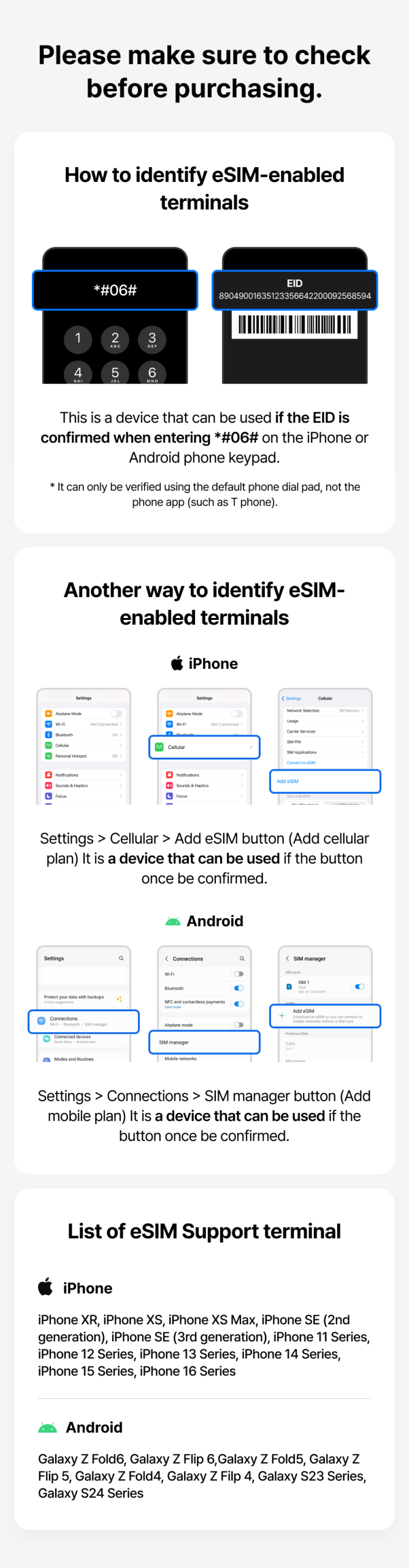
📱 How to check eSIM support terminal
In the phone app
👉 *#06# input
When the EID item is displayed, it is an eSIM support terminal.
━━━━━━━━━━━━━━━━━━━━
📞 Customer Center
💬 Kakao Talk Channel: Hot Youth
💬 WeChat : triptogoworld
💬 Line : triptogo.world
💬 WhatsApp : +8618611532841
☎ Customer Center : 070-8691-4688
━━━━━━━━━━━━━━━━━━━━
💸 Exchange and refund policy
✔ Refundable if not used within 30 days of purchase.
✔ Refunds are not available after use (activation)
✔ In case of a problem, it is necessary to contact the customer service center before deleting eSIM.
━━━━━━━━━━━━━━━━━━━━
⚠️ Please check it.
✔ eSIM can only be used on the first registered terminal.
✔ Depending on the overseas communication environment, some areas may be slow.
✔ Depending on the smartphone model and local frequency environment, it can be connected to 3G instead of LTE.
